

Not so long ago, the workflow was simple: fill a card, dump it to a drive, wipe the card, shoot again. Cards were small enough that you never let them linger. A 64GB or 128GB CFexpress card might hold a day's worth of RAW stills. You cleared it that evening and started fresh.
That logic starts to break down when your card holds a terabyte. A 1TB CFexpress card can hold multiple full shooting days, several client projects, B-roll from three different locations, and still have room left over. Wiping it between every job is no longer the obvious move - and for a lot of filmmakers and photographers, it has stopped being the default one.
That shift creates a genuinely new problem: knowing what is on your card, what has been backed up, and what you can safely clear to make room for the next shoot. Getting that wrong is expensive. These cards are not cheap, the footage on them can be irreplaceable, and the wrong deletion on a location job - where your home drives are 200 miles away - is the kind of mistake you only make once.
What This Article Covers
- Why 1TB CFexpress cards represent a genuine workflow shift for filmmakers and photographers
- Honest reviews of three of the best 1TB CFexpress Type B cards available in 2026
- How DriveVault's catalog and compare features solve the problem of knowing what is on your card - and what is safely backed up - wherever you are
CFexpress Type A vs Type B: This article covers Type B cards, which are used in Canon EOS R3, R5, R5 II, R1, Nikon Z9, Z8, Z6 III, RED and Blackmagic cameras, among others. Sony's higher-end mirrorless cameras (A1, A9 III, FX3, FX6) use the smaller CFexpress Type A format. Type A and Type B are not interchangeable.
The Three Cards Worth Knowing About
The 1TB CFexpress Type B market has grown significantly over the past two years. It is also one of the categories most affected by the ongoing memory shortage - prices have roughly doubled since early 2025 and are highly volatile. All prices below were verified live at B&H Photo on August 4, 2026. Check current pricing before purchasing, as both sales and increases happen regularly. All specs are independently verified from published reviews and manufacturer data.
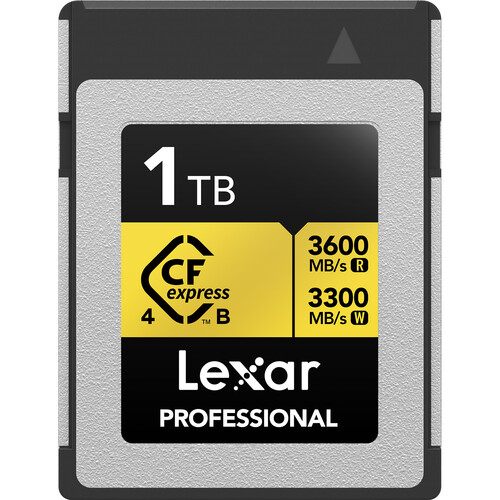 Image: B&H Photo
Lexar Professional GOLD CFexpress 4.0 Type B 1TB
Best Value - Recommended Starting PointLexar's Gold 4.0 sits above their Silver series in the lineup and uses the CFexpress 4.0 standard (PCIe Gen 4) rather than the older 2.0 interface. The headline figures - 3,600 MB/s read and 3,300 MB/s write - represent a genuine step up in ceiling performance, although in practice no current camera can saturate a 4.0 card. Where the 4.0 standard pays off immediately is when offloading footage: paired with a compatible CFexpress 4.0 reader, the Lexar GOLD 4.0 moves data roughly twice as fast as its 2.0 predecessor. A full 1TB dumps in a fraction of the time.
The 3,000 MB/s sustained write speed is the key figure for in-camera recording. It is comfortably ahead of what any current mirrorless or cinema camera demands, which means this card has meaningful headroom for future camera bodies. Tested at B&H with SSD Review's methodology, the card held a 1,510 MB/s sustained average across an 85GB 8K transfer - well within spec and with no thermal throttling noted. Compatibility is broad: Canon EOS R3, R5 II, R5 C, R1, Nikon Z9, Z8, Z6 III, RED V-RAPTOR, Blackmagic Cinema 6K. The 8-point ruggedisation (temperature, vibration, wear-out, dust IP5X, drops, shocks, compression, bends) and a limited lifetime warranty round out a comprehensive package.
At $699.99 (currently $100 off the $799.99 list price at B&H), this is the most accessible of the three cards reviewed here. It is worth noting that prices on CFexpress cards are volatile - they have fluctuated significantly in both directions over the past six months, and deals below $400 have appeared on Amazon during promotional periods. Check current pricing before buying.
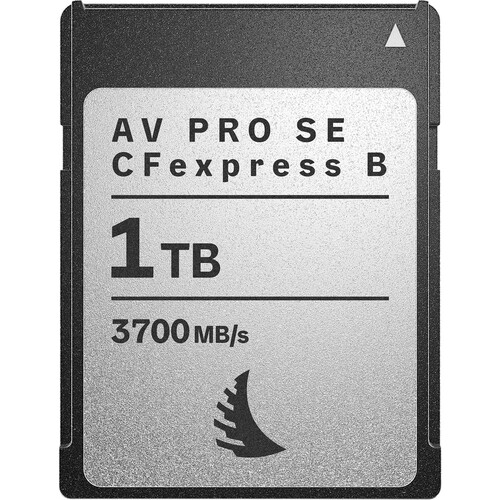 Image: B&H Photo
Angelbird AV PRO SE CFexpress v4 Type B 1TB
Editor's Pick - Best PerformanceAngelbird is an Austrian company that has built a strong reputation in professional media storage over the past decade, and the AV PRO SE v4 is their most capable CFexpress Type B card to date. The jump to CFexpress v4 brings headline read speeds of 3,700 MB/s and sustained writes of 2,100 MB/s - figures that put it in a different performance tier from CFexpress 2.0 cards. In practice, most current cameras cannot saturate a 2.0 card, let alone a 4.0 one, but the headroom matters for futureproofing and for transfer speeds when offloading footage to a compatible card reader.
Angelbird's "Stable Stream" technology is the key differentiator from most competitors. It guarantees that write speeds will not throttle or drop during extended recording - the 2,100 MB/s minimum sustained figure is a floor, not an average. For cinematographers shooting long-form 12K RAW or ultra-high-bitrate cinema formats, this consistency matters more than the peak headline figure. The card is compatible with Canon EOS R5 II, R5 C, Nikon Z9, Z8, RED V-RAPTOR 8K, and Blackmagic Cinema cameras, among others.
The v4 card is also built to a noticeably higher physical standard. It is rated for extreme temperature, moisture, dust, shock, x-ray, and magnetic exposure - a meaningful consideration for documentary filmmakers, news crews, and any shooter working in unpredictable environments. Firmware updates via the Angelbird card reader can optimise performance and extend card lifespan over time.
The $599.99 price sits below the Lexar Gold at $699.99, which makes it the most accessible of the three CFexpress 4.0 cards here. It is justified for cinematographers and shooters whose cameras can take advantage of v4 speeds, and for professionals working in demanding environments where the Stable Stream guarantee and rugged build matter. For still photographers on current-generation cameras, the difference in sustained write performance between these cards will be imperceptible in field use.
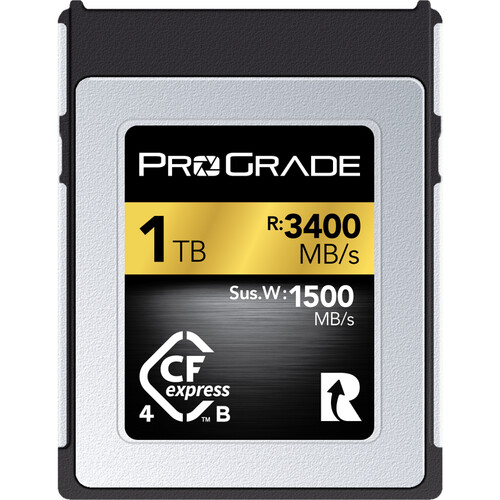 Image: B&H Photo
ProGrade Digital CFexpress Type B Gold 4.0 1TB
Best for Reliability-First ProfessionalsProGrade Digital was founded in 2018 by former executives from established memory brands, and has earned a reputation for producing cards that prioritise consistent, verified performance over marketing headline numbers. The Gold 4.0 Type B is their mid-tier CFexpress 4.0 offering - below the flagship Cobalt in sustained write performance, but covering 1TB in a way the current Cobalt (available only at 1.3TB) does not.
The Gold 4.0 specifies a 2,400 MB/s minimum sustained write speed - a notably high floor that the company bases on extensive internal testing. In Shuttermuse's independent testing, the ProGrade Cobalt 2.0 card achieved sustained writes just shy of 1,400 MB/s; the Gold 4.0 comfortably clears that with significant headroom. Nikon has historically used ProGrade Cobalt cards to validate burst depth specifications on the Z8 and Z9, which speaks to the brand's standing in the professional community.
The two-year warranty is among the stronger guarantees in this category - the Lexar Gold's limited lifetime warranty varies in what it actually covers, while ProGrade's terms are clear and well-documented. For commercial photographers who treat gear failure as a professional risk rather than a personal inconvenience, warranty clarity has real value.
The price is the honest downside. At $749.99 it is the most expensive of the three, and the hardest to justify on pure spec comparison - the Angelbird AV PRO SE offers comparable v4 read speeds for $150 less. The case for ProGrade rests on its RED certification, its strong reliability track record in the professional community, and warranty clarity. A B&H reviewer noted in May 2026 that the card is "the gold standard" but that the price "doubling and tripling is simply insane" - which is a fair summary of where the market is right now.
The Workflow Problem That 1TB Cards Create
Here is the scenario that comes up more and more often as 1TB cards become common. You are a photographer or filmmaker on location - a multi-day commercial shoot, a wedding weekend, a documentary trip. Your 1TB card has footage from the last job still on it, because there was no reason to wipe it. It has 340GB of your current shoot. And somewhere in the mix is a folder of personal work you were keeping there temporarily.
You are running low on card space. You need to decide what you can delete to free up room for the rest of the shoot.
The question you actually need to answer is: what on this card is definitely backed up somewhere else? Not what do you think is backed up. Not what you planned to back up. What is verifiably, definitely, on a drive at home or in the cloud right now, in its complete form.
Without a catalog of both the card and your home drives, that question is genuinely hard to answer from location. The wrong answer is expensive.
How DriveVault Solves This - Step by Step
The combination of DriveVault's scan and compare features was built for exactly this problem. Here is how it works in practice.
-
1Scan each card when you get home after a shootDriveVault reads the complete file structure of your CFexpress card - every folder, file name, size, and date. This takes a couple of minutes and creates a permanent searchable catalog of that card's contents at that moment.
-
2Scan your backup drives tooEach time you copy footage to an external drive, scan it in DriveVault. Now you have catalogs of both the card and the backup.
-
3Six weeks later, on location with a nearly-full cardYou need to free up space. Open DriveVault on your laptop - no drives, no card needed. Browse the catalog of your 1TB card from that last scan.
-
4Use the Compare featureCompare the card's catalog against the catalog of your backup drive. DriveVault shows you exactly which files are present on both, which are only on the card, and which are only on the drive. A visual, file-by-file breakdown.
-
5Delete with confidenceAny folder that shows as fully present on your backup drive can be cleared from the card without risk. You are not guessing. You have verified evidence.
Two Other Things DriveVault Does for Card Users
Search Across All Cards and Drives at Once
If you carry more than one card - or have a library of cards from previous jobs - DriveVault catalogs all of them and lets you search across everything simultaneously. Search by filename, folder name, or any tag you have applied - if you dropped your Barcelona shoot into a folder called "Barcelona_2026" or tagged the card accordingly, every matching file surfaces instantly across every cataloged card and drive, regardless of which one is physically near you. No more plugging in five cards to find one folder.
A Record of What Was on the Card If It Fails
CFexpress cards are extremely reliable. But no storage medium is immune to failure, and a 1TB card with three client shoots on it represents a meaningful volume of work. If a card does fail, a DriveVault catalog gives you an exact record of what was on it - essential for understanding what data recovery might be needed and what you are working to retrieve. Without a catalog, you are reconstructing the card's contents from memory.

The Bigger Picture
The shift toward large-capacity CFexpress cards is part of a broader trend in professional storage - one we have covered in our articles on the ongoing storage price crisis and the resulting pressure on every part of a creator's gear budget. When a single memory card costs $600-750 and holds work that cannot be reshot, treating it casually is not an option.
The cards reviewed above are all genuinely excellent. Choose based on your camera system's compatibility, your shooting format's sustained write requirements, and your budget. The Lexar Gold is the right starting point for most; the Angelbird v4 and ProGrade Gold 4.0 are for shooters who need the headroom of CFexpress 4.0 speeds and are prepared to pay for it.
Whatever card you choose, the one consistent recommendation is this: scan it in DriveVault. Know what is on it. Know what is backed up. Never make a deletion decision based on what you think you remember backing up.
DriveVault catalogs your cards, drives and libraries so you can compare, search and verify backups - wherever you are. Free for your first drive or card up to 4TB.
Download DriveVault Free